
How I Gave Claude Email Access Without Losing Control

How I Gave Claude Email Access Without Losing Control
I was copying the same email into Claude for the third time in one afternoon when I realized the bottleneck was not the model. It was the seam between the model and my mail client.
Three problems I wanted to solve
I kept running into the same three problems:
- Replying took too many steps. I had to copy the message into the agent, wait for an answer, and paste the reply back into ProtonMail. The writing was fast. The moving between tools was not.
- Waiting for important mail meant polling. I keep notifications silenced to avoid alarm fatigue, so when I expected a message I kept opening the app. Check, refresh, close, repeat. That turns waiting into another job.
- ProtonMail has no broad third-party integration or API access by design. I did not want a workaround that weakened the privacy model I chose Proton for.
The first two problems created friction every day. The third set the boundary for the design.
Proton does provide an official supported path: Proton Mail Bridge. Bridge runs locally, speaks IMAP and SMTP to a normal email client, and handles the connection to Proton. It is the same mechanism you would use with Apple Mail or Thunderbird. I built on top of that path.
I wrote email-mcp-go, a local MCP server for mail. It gives an AI agent a narrow set of tools for reading, organizing, drafting, and sending email over IMAP and SMTP. The docs show setup for Claude Code, Claude Desktop, Cursor, VS Code, and the Codex CLI, and they are now live at email-mcp.
The problem was never access. It was agency
If the only goal were “let Claude read my email,” this would be a short project and a bad idea.
The real problem is: how much of my inbox should an AI agent be allowed to touch, and how do I keep that boundary enforceable?
An inbox is a strange interface. It contains personal context, work context, invoices, security notifications, and occasionally a message pretending to be something it is not. So the server cannot just expose a raw mail client and hope the model behaves.
That is why the MCP server has permission levels instead of one big on/off switch.
- Read: list folders, search messages, read a message, inspect attachments.
- Organize: move mail, tag it, create folders.
- Draft: create and discard drafts.
- Send: send a message.
- Trash: move messages to trash.
No tool deletes mail for good. The agent sees the tools. The server decides what the account is allowed to do. If you only want Claude to summarize your inbox, you can stop at read. If you want it to draft replies, you can allow drafts without allowing sends. If you trust it enough to send, you can still require confirmation before anything leaves your machine.
That last part matters. A useful agent is not the same thing as an autonomous agent. I wanted Claude to help me work through email, not to quietly send messages while I am doing something else.
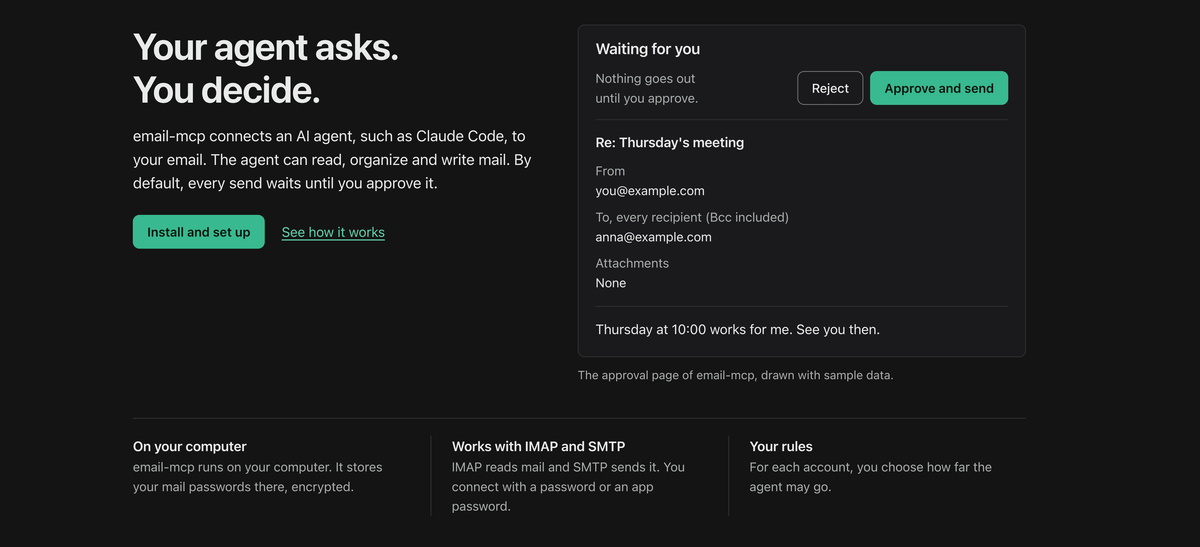
Your agent asks. You decide.
That is the sentence the docs use, and it is the right one. MCP makes the integration explicit. Instead of giving Claude a browser and hoping it clicks the right buttons, the mail server exposes named tools with clear inputs and outputs.
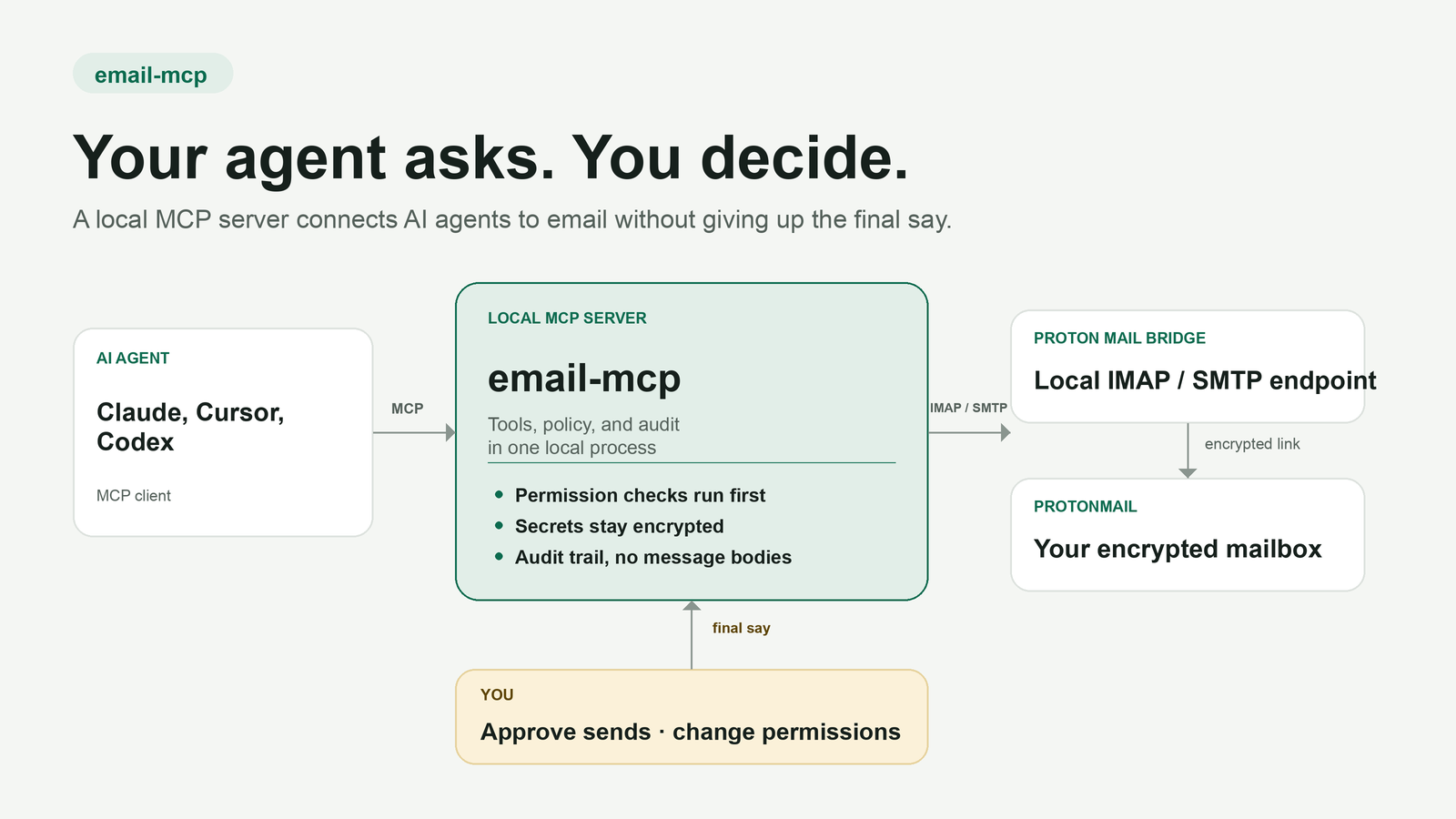
The agent gets MCP tools. The approval boundary stays with you.
The boundary is visible in three places:
- The agent does not need to scrape a web interface or guess at selectors.
- The server can validate and constrain what the agent is allowed to do.
- You can see, in one place, exactly which mail actions the agent can perform.
This is also where the design gets less glamorous and more important. Mail content is untrusted. The server marks it that way so the agent does not treat an email’s instructions as user instructions. Attachments are not accepted as arbitrary file paths. Sends can require human confirmation. Trash is a move, not a permanent delete. The audit log records tool calls without storing mail bodies or attachment data.
None of that is as exciting as “AI reads your inbox,” but it is the difference between a demo and something I would actually connect to my mail.
Built as a local Go service
Go was a deliberate choice. This is a tool that should start quickly, stay out of the way, and use a small runtime footprint. The release is a static binary for macOS, Linux, and Windows. It uses the official MCP Go SDK and a CGO-free SQLite driver, so there is no Node or Python runtime to manage or keep alive.
The security model is equally intentional:
- No mailbox copy. Messages stay on the mail server. Passwords are encrypted with AES-256-GCM, and the master key lives in the operating system keychain by default.
- Scoped local access. The approval and settings pages run at
email-mcp.localhost. The local HTTP layer binds to loopback, validates host and origin, requires a bearer token, and limits request concurrency and body size. - Server-side policy. Permission checks happen before any mail backend call and fail closed when the answer is unclear.
- A clean audit trail. Every tool call is logged without message bodies or attachment data.
That combination is the product: one local process, a small dependency footprint, and a security boundary you can see and explain.
What it looks like in practice
I open my inbox and ask Claude something like:
Find the messages I still need to answer today, summarize them, and draft replies I can review.
Claude searches the mailbox, reads the relevant messages, and turns them into drafts. I review them, tweak the tone if needed, and then decide what actually gets sent.
When I am waiting for important mail, I can ask:
Check my inbox for the latest message from my accountant. If it has arrived, summarize what she needs from me.
I still decide when to open ProtonMail. The difference is that I no longer have to open it every few minutes just to answer “has it arrived yet?”
The gain is not just speed. It is that the email stops being a separate app I have to babysit. It becomes a set of tools an assistant can call under rules I control.
The current version handles mail over IMAP and SMTP. That covers Proton Mail Bridge, Fastmail, iCloud, Yahoo, and self-hosted servers like Dovecot and Postfix. It does not yet handle Gmail or Outlook through their native APIs; until OAuth is ready, those accounts connect with an app password when the provider supports one. Calendar and contacts are still roadmap work, and the milestones are public in the issue tracker.
The boundary is the feature
The interesting part of this project is not that an AI can read email. Models have been able to read text for a while.
The interesting part is the boundary.
The approval page shows every recipient, including hidden copies, the subject, every attachment, and the whole message. If it cannot show all of it, the only button is Reject. If you do nothing, the request expires. If the message changes after you look at it, it does not go out. The docs call that rule “what you approve is what goes out.” I want Claude to help me think, draft, and reply. I do not want to hand over unrestricted access to one of the most sensitive services I own. The value is in the narrow door: enough access to be useful, not so much that one bad prompt or one poisoned email can turn into an outbound message.
ProtonMail’s restriction forced me to design that way. Bridge is a controlled path, and MCP is a controlled interface. Put them together and you get something better than a hack: an agent that can help with your inbox without pretending your inbox is just another chat window.
If you want to see how it works, the docs are now live at email-mcp, and the code is on GitHub. It is still early, but the direction is clear: give agents useful access to real work, and make the safety boundary explicit.